Online EXIF Viewer Guide: Image Metadata Extraction Tool
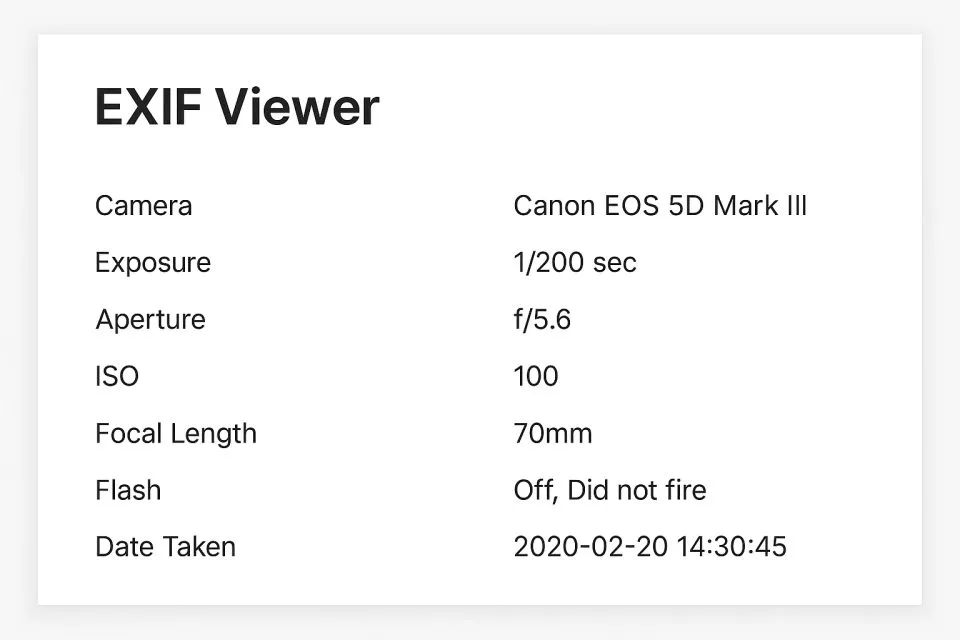
What is Online EXIF Viewer and Its Uses?
Our Online EXIF Viewer is a powerful image metadata extraction tool that can quickly read and analyze EXIF (Exchangeable Image File Format) information embedded in images. EXIF data contains rich metadata such as shooting parameters, camera information, GPS location, etc., which is valuable for photographers, designers, researchers, and general users. With our EXIF Information Viewer, you can view complete metadata information of images directly in your browser without installing any software. All processing is done locally, ensuring your privacy and security.
Common Application Scenarios of EXIF Viewer
- Photographers view and analyze shooting parameters to learn excellent photo techniques
- Verify authenticity and source of images, check shooting time and location information
- Organize and archive photos, automatically categorize and organize based on EXIF information
- Geotagging and location tracking, view GPS coordinates and shooting locations of photos
- Camera and lens performance analysis, compare shooting effects of different devices
- Copyright protection and evidence collection, extract original shooting information of images
- Reference for post-processing photos, understand original shooting parameters for precise adjustment
- Travel records and memory organization, review shooting locations through GPS information
Professional Tip:
Most social media platforms (such as WeChat, Weibo) automatically delete EXIF data when uploading images to protect privacy. If you need to view complete EXIF information, please use the original unprocessed image files.
EXIF Metadata Viewing tool is particularly useful for photographers, designers, researchers, and anyone who needs to understand detailed image information. By using our EXIF viewer, you can gain deep insights into the shooting background of images, verify authenticity, or simply satisfy your curiosity about image information. Our tool supports multiple image formats, including JPEG, HEIC, WebP, PNG, and some RAW and TIFF formats, making this process simple and efficient without installing any software.
Frequently Asked Questions
What is EXIF data?
Will viewing EXIF information leak my privacy?
Why do some images have no EXIF information?
Which image formats are supported?
How is GPS information displayed?
Can multiple images be processed in batches?
What data formats are supported for export?
How to Use Online EXIF Viewer
Upload Your Images
First, upload the images whose EXIF information you want to view. You can directly drag and drop files into the upload area, or click browse and select files from your device. Our tool supports multiple formats including JPEG, HEIC, WebP, PNG, RAW, and TIFF.
You can upload multiple images at once for batch processing.
View EXIF Information
After uploading, the tool will automatically read the EXIF data of the images. If the images contain EXIF information, you will see detailed metadata, including basic shooting information (camera brand/model, shooting time, file size, etc.), shooting parameters (aperture, shutter, ISO, etc.), GPS location, and advanced metadata.
If the images do not contain EXIF data, the tool will display the corresponding prompt information.
View GPS Location
If the images contain GPS coordinate information, you can see latitude and longitude coordinates (displayed in degree-minute-second format) in the GPS information section and view the shooting location on an integrated map. Click the "Reverse Geocoding" button to convert GPS coordinates into actual geographic location names.
Map display requires an internet connection, and the first load may take some time.
Export EXIF Data
You can choose multiple ways to export EXIF information: click the "Export JSON" button to download complete structured data; click the "Export CSV" button to download tabular data; click the "Export Summary Report" to get a concise text report; or click "Export Visualization Charts" to view parameter visualization.
For batch processing of images, you can use the "Batch Download" function to export all data at once.
Analyze Shooting Parameters
In the shooting parameters section, you can view information such as aperture value, shutter speed (human-readable display, such as 1/125 sec), ISO sensitivity, focal length, etc. These parameters are very useful for learning photography skills, analyzing photo quality, or verifying shooting conditions.
The tool will automatically convert shutter speed to an easy-to-read format, such as "1/125 sec" instead of decimal form.
Save and Manage Results
After processing is complete, you can download the EXIF information of each image individually, or use the batch download function to package and download all data. All exported files are saved locally on your device, ensuring data security.
It is recommended to regularly clean the browser cache to free up storage space.
Congratulations!
You have successfully learned how to use our online EXIF viewer. Now you can easily view and analyze metadata information of images, gaining deep insights into the shooting background and parameter settings of each photo.
Related Tools You Might Be Interested In
Image Compressor
Reduce image file size without significant loss of quality.
Image Resizer
Resize images to specific dimensions or scale by percentage.
Image Color Inverter
Online tool to invert image colors and create negative effects.
QR Code Generator
Create custom QR codes for URLs, text, contact information, etc.
Reference Resources
- EXIF Standard Specification
Learn about the official standards and technical specifications of EXIF data format
- Digital Image Metadata
Detailed explanation of image metadata and EXIF information
- GPS Coordinate System
Learn about GPS coordinate systems and geolocation technology